























- Description
- Minimum Requirements
- Specifications
- Additional information
Autodesk Advance Steel is a specialized 3D modeling software for structural steel detailing, ideal for students and future engineers. With instant digital delivery and a flexible subscription model, it offers long-term access to professional-grade tools used in real-world fabrication workflows.
Designed for precision and efficiency, Autodesk Advance Steel helps users create accurate steel structures, detailed drawings, and fabrication-ready models on Windows systems.
Overview of Autodesk Advance Steel
- Platform: Windows
- Edition: Advance Steel Educational
- License Type: Educational (non-commercial)
- Devices: 1 device per eligible user
- License Duration: 1 Year / 3 Years
- Activation Method: Online activation
- Delivery: Instant digital delivery via email
- Support: Email and remote assistance
- Language Support: Multi-language
- Compliance: Genuine software licenses sourced through compliant distribution channels in line with U.S. laws and industry standards
Key Features
- 3D Steel Modeling: Create detailed structural steel models with intelligent components, improving design accuracy and reducing manual work.
- Automated Fabrication Drawings: Generate shop drawings and documentation automatically, saving time and ensuring consistency.
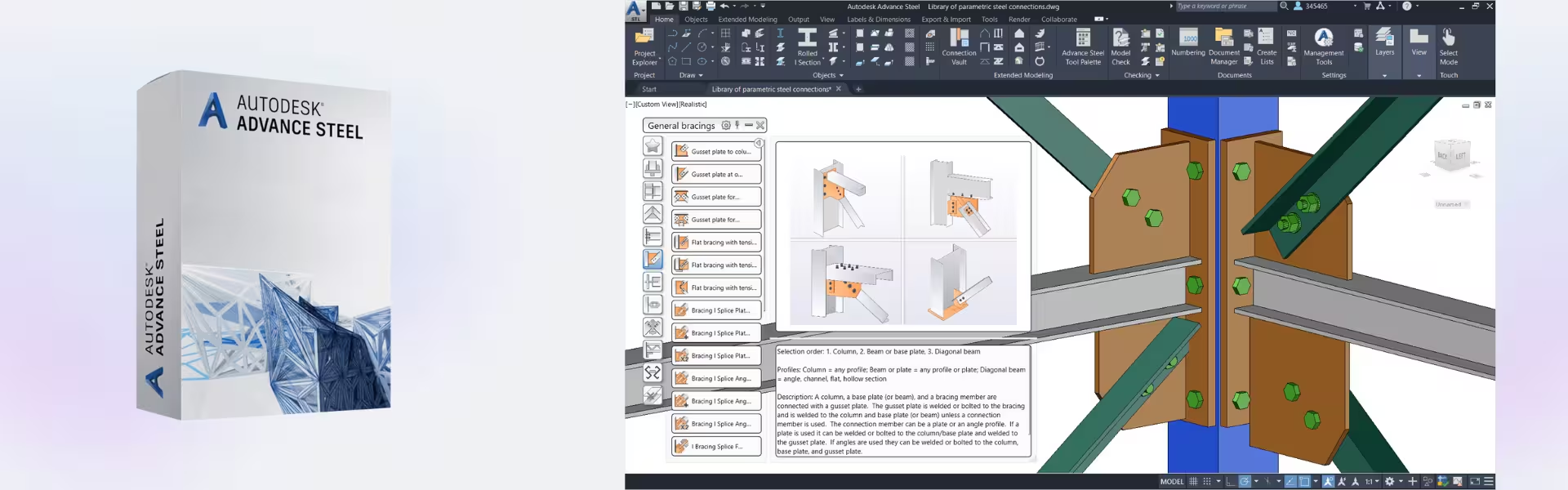
- Connection Design Tools: Model complex steel connections with precision, helping users produce fabrication-ready designs.
- Bill of Materials (BOM) Generation: Automatically create material lists for projects, improving planning and cost estimation.
- Clash Detection: Identify conflicts in structures early, reducing errors during fabrication and construction.
- Integration with BIM Workflows: Collaborate with other Autodesk tools to streamline project coordination.
- Customization Options: Adapt design templates and workflows to match project requirements efficiently.
Main Features Explained
Steel Structure Modeling
Autodesk Advance Steel enables users to create detailed 3D models of steel structures such as buildings, bridges, and industrial frameworks. In real-world scenarios, engineers can visualize and refine designs before fabrication, reducing costly errors.
Fabrication and Shop Drawings
The software automatically generates detailed drawings from the 3D model. This is essential for students and professionals learning how to prepare accurate documentation for manufacturing and construction.
Connection and Joint Design
Users can design complex joints and connections between steel components. This improves structural integrity and ensures compliance with engineering standards.
Material Management
Autodesk Advance Steel produces bills of materials and part lists, helping users plan resources efficiently and manage project costs.
Collaboration and BIM Integration
The software integrates with BIM workflows, allowing teams to collaborate and share data across different project stages, improving coordination and efficiency.
Why Choose Autodesk Advance Steel?
Autodesk Advance Steel is ideal for structural engineering students, steel detailers, and professionals who want to master fabrication workflows. It provides a complete environment for designing, documenting, and preparing steel structures for production.
Explore more tools in our CAD & Engineering Software collection to expand your engineering capabilities. For reality capture and project data integration, Autodesk Advance Steel can be complemented by Autodesk ReCap Pro, which helps integrate scanned data into design workflows.
For fabrication workflows, you can also consider Autodesk Fabrication, while simulation and performance testing can be enhanced using Autodesk CFD Ultimate.
Autodesk Advance Steel vs Alternatives
Compared to general CAD tools, Autodesk Advance Steel is specifically designed for structural steel detailing and fabrication. It offers specialized tools for connections, materials, and automated drawings that are not available in standard CAD software.
When compared to fabrication-focused tools, Advance Steel provides deeper modeling capabilities and tighter integration with BIM workflows, making it ideal for full project lifecycle management.
System Compatibility
Autodesk Advance Steel is designed for Windows systems and requires a capable workstation to handle complex 3D structural models. It integrates seamlessly with other Autodesk solutions for efficient project workflows.
The license is not transferable, but it ensures access to updates and features during the active subscription period.
Installation & Activation
- Complete your purchase and receive your access details via email instantly.
- Sign in to your Autodesk Account.
- Download Autodesk Advance Steel from the official Autodesk platform.
- Install the software on your Windows device.
- Activate using your Autodesk Account credentials.
- Start working on your structural projects.
Why Buy From Us
Digital License provides a secure and reliable platform for professional software solutions.
- Instant digital delivery via email
- Genuine software sourced through compliant channels
- Secure payment processing
- 24/7 email and remote assistance
- Compliance with U.S. laws and industry standards
Trust & Reliability
We ensure every product is authentic and backed by professional support. Our focus on compliance and customer satisfaction guarantees a safe and reliable purchasing experience.
FAQ
How do I activate Autodesk Advance Steel?
Activation is completed online through your Autodesk Account after installation.
When will I receive my order?
Your product is delivered instantly via email after purchase.
Is Autodesk Advance Steel compatible with Mac?
No, it is designed for Windows systems only.
Can I install it on multiple devices?
No, the license is valid for one device per eligible user.
Is this software legitimate?
Yes, it is sourced through compliant distribution channels and meets industry standards.
Do I receive updates?
Yes, updates are included during the active subscription period.
What support is included?
We provide 24/7 email and remote assistance for installation and usage.
| Component | Requirement |
| Processor | 2.5–2.9 GHz processor (minimum) 3+ GHz processor (recommended) |
| RAM | 8 GB (minimum); 16 GB or more (recommended) |
| Storage | 20 GB free disk space (SSD recommended) |
| Operating System | 64-bit Windows 11 or Windows 10 |
| Graphics | DirectX 12–compatible GPU with 2 GB VRAM (minimum) 4 GB VRAM or more (recommended) |
| Display | 1920 × 1080 resolution with True Color High Resolution & 4K supported |
| Specification | Detail |
|---|---|
| Activation | Single PC (one-time activation) |
| License validity | 1 year / 3 years (renewable annually) |
| Delivery method | By email within 15 minutes |
| Languages | Multilingual |
Additional information
| Year version | 2024, 2025, 2026, 2027 |
|---|---|
| Subscription period | 1 Year, 3 Years |

1 – Buy
Shop securely with SSL encryption.

2 – Receive
You will receive the license key and download link.

3 – Download
Download and install the software.

4 – Activate
Enter the license key to the software.

VMware vCenter Server 7 Standard
Vmware vCenter Server 8 Standard
