























- Description
- Minimum Requirements
- Specifications
- Additional information
Power BI Premium is a powerful business intelligence solution designed for organizations that require enterprise-scale analytics, secure data sharing, and advanced reporting. With instant digital delivery and online activation, your team can quickly access premium tools for transforming complex business data into clear, actionable insights.
Built for growing companies and large organizations, this solution combines advanced governance, enhanced processing capacity, AI-powered analysis, and scalable cloud collaboration. Access remains active for the full duration of the selected subscription plan.
Overview of Power BI Premium
- Platform: Windows (Power BI Desktop) + Power BI cloud service (web/mobile)
- Edition: Premium (enterprise features, advanced governance and scalability)
- License Type: Retail
- Devices: 15 / 100 users
- License Duration: Subscription (license access remains active while the plan is valid)
- Activation Method: Online activation
- Delivery: Instant digital delivery via email
- Support: Email and remote assistance
- Language Support: Multi-language
- Compliance: Genuine software licenses sourced through compliant distribution channels in line with U.S. laws and industry standards
Key Features
- Dedicated Premium Capacity – Maintain consistent report performance during busy working hours without depending entirely on shared processing resources.
- Large Dataset Support – Process substantial volumes of company information to produce detailed reports and more complete business insights.
- AI-Powered Analysis – Identify trends, forecast potential outcomes, detect anomalies, and uncover opportunities with integrated artificial intelligence capabilities.
- Enterprise Governance – Control permissions, security policies, data access, and administrative standards across the organization.
- Scalable Collaboration – Distribute dashboards across departments while ensuring that each user only accesses authorized information.
- Paginated Reporting – Produce structured, print-ready reports for financial reviews, operational records, management meetings, and compliance requirements.
- Cloud and Mobile Access – Review updated reports through supported browsers and mobile applications wherever business decisions are made.
Main Features Explained
Interactive Dashboards
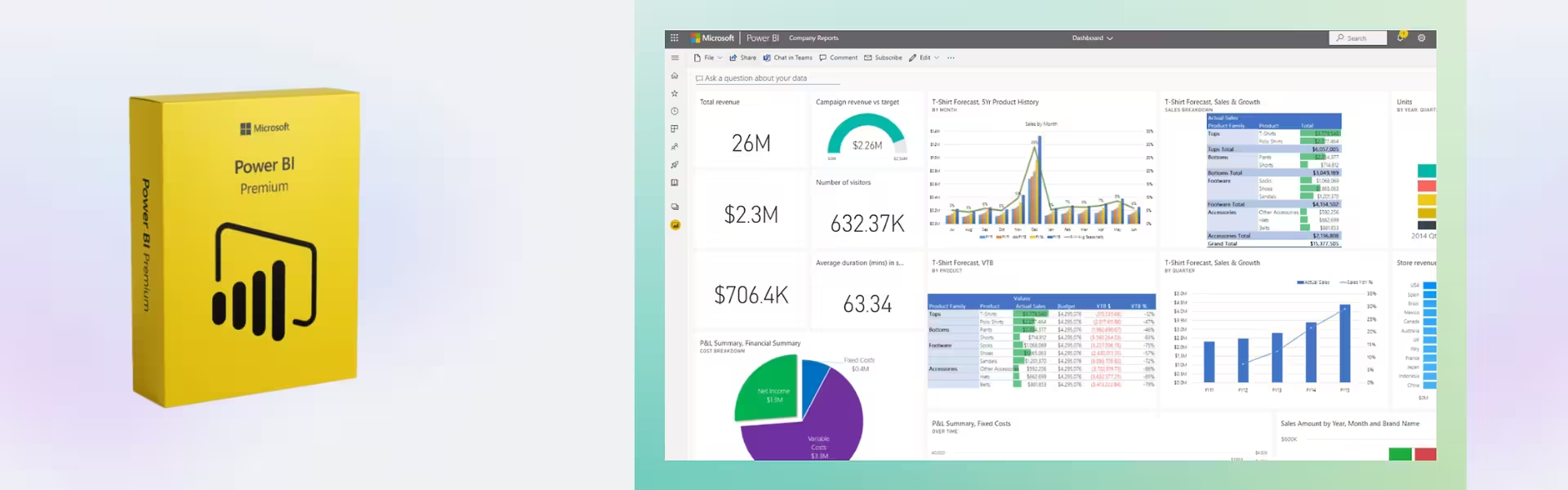
Create visual dashboards that bring information from multiple business systems into one centralized workspace. Executives and managers can monitor sales, operational performance, financial results, and essential KPIs without reviewing numerous disconnected files.
Advanced Data Modeling
Combine information from spreadsheets, databases, cloud services, ERP platforms, and CRM systems. Analysts can establish relationships between different data sources and uncover patterns that may be difficult to detect through conventional reporting methods.
AI-Powered Insights
Use intelligent analytics to detect unusual changes, forecast future performance, and highlight important business trends. These capabilities help teams reduce manual analysis and respond more quickly to emerging risks or opportunities.
Enterprise Report Distribution
Publish reports through the Power BI cloud service and make updated information available to authorized colleagues. Teams can review the same data from office computers, web browsers, tablets, or mobile devices.
Security and Centralized Administration
Administrators can manage access permissions, monitor usage, apply governance policies, and protect sensitive company information. This gives employees practical access to useful reports without compromising organizational control.
Why Choose Power BI Premium?
Power BI Premium is designed for data-driven organizations that need more than basic visualization tools. It supports financial reporting, sales analysis, inventory monitoring, customer behavior research, operational planning, and executive decision-making from a centralized analytics environment.
Companies can explore additional business intelligence and analytics software to develop a more complete reporting infrastructure for different departments and workloads.
For organizations that also require professional document creation, presentations, email management, and office applications, Microsoft Office 2024 Professional Plus offers a productivity-focused alternative rather than a dedicated enterprise analytics platform.
Power BI can also work alongside Microsoft Excel 2024, helping users move from traditional spreadsheets and PivotTables to interactive dashboards, shared reports, and more efficient data visualization.
Power BI Premium vs Alternatives
Power BI Premium vs Power BI Pro
- Power BI Premium is built for larger deployments that require dedicated capacity and greater scalability.
- Premium supports more demanding datasets and enterprise-level analytics workloads.
- Premium includes advanced functionality such as paginated reports and enhanced AI capabilities.
- Premium offers stronger governance and administration options for complex organizations.
- Power BI Pro is generally more suitable for smaller teams with standard report creation and collaboration requirements.
Power BI Premium vs Excel
Excel is well suited to individual calculations, spreadsheet management, formulas, and smaller analytical tasks. Power BI Premium is more appropriate when an organization needs interactive dashboards, centralized governance, automated data refreshes, secure report distribution, and analysis across large or connected datasets.
System Compatibility
Power BI Desktop is designed for supported Windows operating systems and is used to create data models, visualizations, and reports. Published reports can be accessed through the Power BI cloud service using modern web browsers and supported mobile applications.
Before installation, verify that the Windows computer meets Microsoft’s current Power BI Desktop system requirements. A stable internet connection is required for downloading the application, completing online activation, publishing reports, and accessing cloud-based functionality.
License Type Explanation
This product is supplied under a Retail licensing model. Retail products are provided directly to the end user and generally offer more flexibility than OEM products, which are normally connected to the original device or hardware configuration.
However, Power BI Premium is a subscription product rather than a perpetual one-time purchase. The service remains available while the selected plan is active, and continued access requires a valid subscription. Transfer or reassignment options depend on the applicable plan and Microsoft’s licensing conditions.
Installation & Activation
- Complete the online purchase using your preferred secure payment method.
- Receive the product information and activation instructions by email.
- Download Power BI Desktop on a supported Windows computer or open the Power BI web service.
- Sign in using the relevant account or activation credentials.
- Complete the online activation and assign access to the included users.
- Create, publish, and securely share business reports across your organization.
Why Buy From Us?
Choose a reliable digital software provider offering fast electronic fulfillment, secure ordering, and professional assistance throughout the activation process.
- Immediate email delivery after successful order processing
- Authentic software products obtained through compliant distribution channels
- Protected payment processing for secure online purchases
- Professional customer assistance by email and remote support
- Regulatory compliance with applicable U.S. laws and industry standards
Why Customers Trust Us
Our service combines dependable software delivery, responsive technical guidance, and secure purchasing. Customers receive clear activation information and access to assistance when installation or account configuration support is required.
Frequently Asked Questions
How is Power BI Premium delivered?
The product information and activation instructions are delivered digitally by email after the order has been processed successfully.
How do I activate Power BI Premium?
Activation is completed online. Follow the instructions received by email and sign in using the appropriate account or activation credentials.
How many users are supported?
The available plans support either 15 or 100 users. Select the option that matches the size and reporting needs of your organization.
Can I use Power BI Premium on a Mac?
Power BI Desktop is developed for supported Windows systems. However, published Power BI reports may be accessed through the cloud service using a supported web browser on other operating systems.
Can users access reports from mobile devices?
Yes. Authorized users can access published dashboards and reports through supported Power BI mobile applications and web browsers.
Does Power BI Premium integrate with Excel?
Yes. Spreadsheet information can be imported, transformed, modeled, and presented through interactive Power BI reports and dashboards.
Is Power BI Premium a lifetime product?
No. It is a subscription product. Access remains active while the purchased plan is valid and must be renewed to continue using the service after the subscription period ends.
Can the subscription be transferred?
Transfer and user reassignment options depend on the selected plan and Microsoft’s applicable licensing terms. Contact support before making significant account or deployment changes.
Is the product legal and genuine?
Yes. The software is sourced through compliant distribution channels in line with U.S. laws and relevant industry standards.
Is technical support included?
Yes. Email and remote assistance are available for installation, activation, and initial configuration issues.
| Component | Requirement |
| Service Type | Cloud-based analytics and reporting service (Microsoft Power BI Premium) |
| User Access | Web browser access or Power BI Desktop for report creation |
| Operating System | Windows 10 or Windows 11 (required for Power BI Desktop) |
| Processor | 1.6 GHz or faster processor (Power BI Desktop) |
| Memory (RAM) | Minimum 8 GB RAM (16 GB or more recommended for large datasets) |
| Storage | At least 5 GB of available disk space for Power BI Desktop installation |
| Browser | Latest versions of Microsoft Edge, Google Chrome, Firefox, or Safari |
| Internet Connection | Required for accessing Power BI service, publishing reports, and collaboration |
| Microsoft Account | Work or school Microsoft account required (Azure Active Directory) |
| Specification | Detail |
|---|---|
| Activation | Single PC (one-time activation) |
| License validity | 1 Year (renewable annually) |
| Delivery method | By email within 15 minutes |
| Languages | Multilingual |
Additional information
| Users | 15, 100 |
|---|

1 – Buy
Shop securely with SSL encryption.

2 – Receive
You will receive the license key and download link.

3 – Download
Download and install the software.

4 – Activate
Enter the license key to the software.

Parallels Desktop 20 Pro Edition Mac
Parallels Desktop Standard 20 Mac


Vmware vCenter Server 8 Standard
