







- Description
- Minimum Requirements
- Specifications
- Additional information
EaseUS VideoKit is a complete video toolkit for Windows and Mac users who need to convert, compress, edit, and manage media files with ease. With instant digital delivery via email, you can install and activate quickly, while the lifetime option gives long-term usage without a subscription.
It is a practical choice for creators, students, business users, and home users who work with videos regularly. Therefore, it helps you save time, improve output quality, and simplify your media workflow.
Overview of EaseUS VideoKit
- Platform: Windows/ Mac
- Edition: VideoKit
- Devices: 1 Device
- License Duration: 1 Month/ 1 Year/ Lifetime
- Activation Method: Online activation
- Delivery: Instant digital delivery via email
- Support: Email and remote assistance
- Language Support: Multi-language
- Compliance: Genuine software licenses sourced through compliant distribution channels in line with U.S. laws and industry standards
Key Features
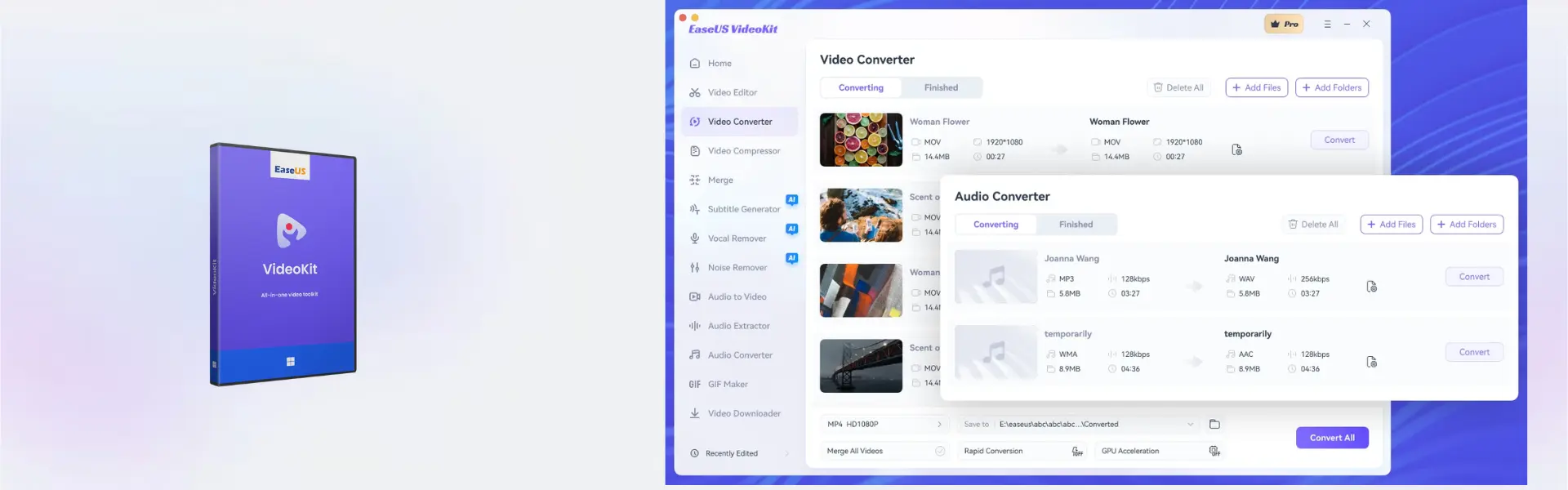
- Video conversion: Convert media files into popular formats, so videos are easier to play, share, and edit.
- Video compression: Reduce file size while keeping usable quality, which helps save storage and speed up uploads.
- Basic video editing: Trim, adjust, and prepare clips for presentations, social media, lessons, or personal projects.
- Audio processing: Manage sound from video files, making content more useful for creators and online work.
- Batch workflow support: Process multiple files more efficiently, saving time on repeated media tasks.
- Windows and Mac support: Use the software on your preferred desktop platform with a smooth setup experience.
- Flexible usage options: Choose monthly, yearly, or lifetime access based on your needs and budget.
Main Features Explained
Video Converter
EaseUS VideoKit helps convert videos into formats suitable for different devices, platforms, and editing tools. This is useful for students preparing projects, businesses sharing presentations, and creators uploading content online.
Video Compressor
The compression feature reduces large video files into smaller sizes. As a result, users can upload faster, store more files, and share videos more easily without wasting time.
Video Editing Tools
Users can make quick edits such as trimming clips and preparing content for publishing. This matters for social media creators, teachers, freelancers, and home users who need clean video output without complex software.
Audio and Media Management
The toolkit also supports media handling tasks that help improve workflow. For example, creators can manage video sound, prepare clips for reuse, and organize media for future projects.
Why Choose EaseUS VideoKit?
EaseUS VideoKit is designed for users who want a flexible media toolkit instead of separate tools for every task. It is suitable for content creators, marketers, students, online teachers, small businesses, and home users who need fast video conversion, compression, and editing.
You can explore more related tools in our EaseUS software collection. If your work focuses more on screen recording, EaseUS RecExperts may be a useful comparison.
EaseUS VideoKit vs Alternatives
EaseUS VideoKit is a broader multimedia toolkit for converting, compressing, and preparing video files. In comparison, EaseUS Video Downloader is more focused on saving online videos for offline use.
If your main need is voice effects and sound transformation, EaseUS VoiceWave Pro may be the better option. However, EaseUS VideoKit is the stronger choice for users who need a wider video workflow in one product.
System Compatibility
EaseUS VideoKit supports Windows and Mac devices. Before installation, make sure your computer has internet access for online activation, enough storage space for video files, and administrator permission to complete the setup.
License Type Explanation
This product is supplied for one device with monthly, yearly, and lifetime duration options available. Activation is completed online, and use follows the selected duration and product terms shown in the overview.
Installation & Activation
- Complete your order and check your email for digital delivery details.
- Download EaseUS VideoKit using the provided instructions.
- Install the software on your Windows or Mac device.
- Open the program and start online activation.
- Follow the activation prompts until the software is ready to use.
- Start converting, compressing, editing, or managing your media files.
Why Buy From Us
Digital License provides a fast, secure, and professional way to purchase software for personal, creative, and business use.
- Instant digital delivery via email
- Genuine software licenses
- Secure payment process
- Email and remote assistance support
- Compliance with U.S. laws and industry standards
Trust & Reliability
Digital License focuses on genuine software, clear delivery, and dependable customer support. Our software licenses are sourced through compliant distribution channels in line with U.S. laws and industry standards.
FAQ
How do I activate EaseUS VideoKit?
You activate it online after installation by following the instructions delivered by email.
How will I receive the product?
You receive instant digital delivery via email after your order is completed.
Is EaseUS VideoKit compatible with Windows?
Yes, it supports Windows devices.
Is EaseUS VideoKit compatible with Mac?
Yes, it also supports Mac devices.
Can I use it on more than one device?
No, this product is supplied for one device.
Does EaseUS VideoKit include a lifetime option?
Yes, lifetime usage is available as one of the duration options.
Can I transfer it to another computer?
Use depends on the selected product terms and device activation rules. Our support team can help with activation guidance.
Is this product legal?
Yes, Digital License supplies genuine software licenses sourced through compliant distribution channels in line with U.S. laws and industry standards.
Do you provide support?
Yes, email and remote assistance support are available for installation and activation help.
| Component | Requirement |
| Processor | Intel® Core™ i3 or faster processor / Intel or Apple Silicon (M1/M2/M3) processor |
| RAM | 4 GB minimum (8 GB recommended) |
| Storage | At least 2 GB free disk space for installation and media processing |
| Operating System | Windows 11/10 (64-bit) / macOS 10.15 or later |
| Graphics Card | DirectX-compatible graphics device / Metal-compatible graphics device |
| Display | 1280 × 720 screen resolution or higher |
| Internet Connection | Required for activation, updates, AI features, and online services |
| Specification | Detail |
|---|---|
| Activation | Single Device License (1 PC) |
| License validity | 1 Month/ 1 Year/ Lifetime (one-time purchase) |
| Delivery method | By email within 5–15 minutes |
| Languages | Multilingual |
Additional information
| Operating systems | Mac, Windows |
|---|---|
| Subscription period | 1 Month, 1 Year, Lifetime |

1 – Buy
Shop securely with SSL encryption.

2 – Receive
You will receive the license key and download link.

3 – Download
Download and install the software.

4 – Activate
Enter the license key to the software.
Parallels Desktop 20 Pro Edition Mac

Corel Painter Essentials 7 (PC - Mac)