







- Description
- Minimum Requirements
- Specifications
- Additional information
EaseUS RecExperts is a professional screen recording solution for Windows and Mac users who need smooth video capture, audio recording, and webcam recording. It includes instant digital delivery, online activation, and flexible duration options, including lifetime usage with no subscription.
Whether you create tutorials, record meetings, save lectures, or capture gameplay, EaseUS RecExperts helps you produce clear recordings with less effort.
Overview of EaseUS RecExperts
- Platform: Windows/ Mac
- Edition: RecExperts
- License Type: Retail
- Devices: 1 Device
- License Duration: 1 month/ 1 Year/ Lifetime
- Activation Method: Online activation
- Delivery: Instant digital delivery via email
- Support: Email and remote assistance
- Language Support: Multi-language
- Compliance: Genuine software licenses sourced through compliant distribution channels in line with U.S. laws and industry standards
Key Features
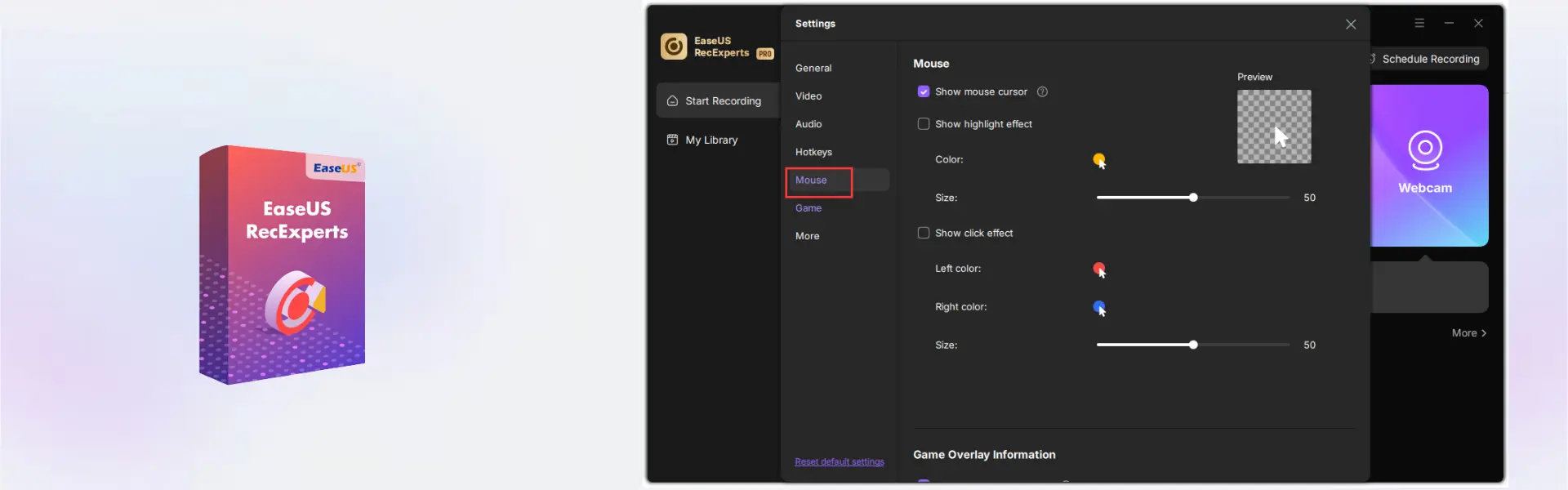
- Full-screen and custom-area recording: Capture the entire screen or a selected area, so you can focus only on the content that matters.
- Webcam recording: Add facecam video to lessons, presentations, or product demos for a more personal and professional result.
- Audio capture: Record system sound, microphone audio, or both, which makes it useful for tutorials, meetings, and commentary videos.
- Scheduled recording: Set recordings to start automatically, so you do not miss webinars, online classes, or live sessions.
- Game recording: Capture gameplay smoothly and create shareable clips for entertainment, training, or content creation.
- Built-in editing tools: Trim recordings and remove unwanted parts before sharing or saving your final video.
- Flexible usage options: Choose monthly, yearly, or lifetime access based on your workflow and budget.
Main Features Explained
Screen Recording
EaseUS RecExperts lets you record your full screen, a window, or a selected area. This is ideal for business users creating training videos, students saving online lectures, and home users recording step-by-step guides.
Webcam and Microphone Capture
You can record your webcam and voice while capturing the screen. As a result, presentations, tutorials, and online lessons feel more engaging and easier to follow.
System Audio Recording
The software can capture internal sound from your computer. Therefore, it works well for recording webinars, video calls, music clips, online courses, and software demonstrations.
Scheduled Recording
With scheduled recording, you can set a start time and let the software capture content automatically. This helps busy users record important sessions even when they are not at the computer.
Editing and Export
After recording, you can trim unnecessary parts and prepare the file for sharing. This improves efficiency because you do not need separate editing software for simple cleanup.
Why Choose EaseUS RecExperts?
EaseUS RecExperts is built for creators, professionals, teachers, students, gamers, and remote workers who need a dependable recording tool. It helps users capture important content, explain ideas clearly, and save valuable information for later use.
If you are looking for practical computer programs for productivity and content creation, this tool is a strong choice. For users who also need file repair features, EaseUS Fixo Pro is a related EaseUS solution with a different purpose.
For broader productivity needs, you may also consider EaseUS Todo PCTrans Professional for PC transfer tasks or EaseUS DupFiles Cleaner for finding duplicate files.
EaseUS RecExperts vs Alternatives
Compared with basic built-in screen recorders, EaseUS RecExperts offers more control over recording area, audio sources, webcam capture, and scheduled recording. This makes it better for users who need professional results rather than quick casual clips.
Compared with advanced video production suites, it is easier to use and more focused. Therefore, it is a practical option for users who want screen recording without a complex editing workflow.
System Compatibility
EaseUS RecExperts works on Windows and Mac devices. Before installation, make sure your device has a stable internet connection for online activation, enough storage for recordings, and suitable system performance for video capture.
License Type Explanation
This is a Retail product for 1 device. It can be installed and activated only once on one computer. It cannot be transferred or used again on another device after activation.
Once activated, the selected duration applies according to your purchase option. If the software is uninstalled or the device is formatted, the activation may be lost.
Installation & Activation
- Complete your order and check your email for instant digital delivery.
- Download EaseUS RecExperts using the provided instructions.
- Install the software on your Windows or Mac device.
- Open the program and start the online activation process.
- Enter the activation details exactly as received.
- After activation, start recording your screen, webcam, and audio.
Why Buy From Us?
Digital License gives you a secure and professional way to purchase software online. You receive fast delivery, genuine software licenses, and reliable support for a smooth activation experience.
- Instant digital delivery via email
- Genuine licenses sourced through compliant channels
- Secure payment process
- Email and remote assistance support
- Compliance with U.S. laws and industry standards
Trust & Reliability
We focus on secure software delivery, clear activation guidance, and dependable customer support. Every order is handled with professional care, so you can purchase with confidence.
Frequently Asked Questions
How is EaseUS RecExperts delivered?
It is delivered instantly by email after purchase.
How do I activate EaseUS RecExperts?
You activate it online using the activation details provided with your order.
Is EaseUS RecExperts compatible with Windows and Mac?
Yes, this product supports Windows and Mac devices.
Can I use EaseUS RecExperts on more than one device?
No, this product is provided for 1 device.
Does EaseUS RecExperts include lifetime usage?
Yes, lifetime usage is available when you choose the lifetime duration option.
Is EaseUS RecExperts a subscription?
The lifetime option does not require a subscription. Monthly and yearly options are also available depending on your selection.
Can I transfer the activation to another computer?
No, this Retail product can be installed and activated only once on one computer and cannot be transferred after activation.
What can I record with EaseUS RecExperts?
You can record your screen, webcam, microphone, system audio, online meetings, tutorials, lectures, and gameplay.
Is this product legal?
Yes, the software licenses are sourced through compliant distribution channels in line with U.S. laws and industry standards.
| Component | Requirement |
| Processor | Intel® Core™ i3 or faster processor / Intel or Apple Silicon (M1/M2/M3) processor |
| RAM | 4 GB minimum (8 GB recommended) |
| Storage | At least 200 MB free disk space for installation |
| Operating System | Windows 11/10/8.1/8/7 (32-bit & 64-bit) / macOS 10.13 or later |
| Graphics Card | DirectX-compatible graphics device / Metal-compatible graphics device |
| Display | 1024 × 768 screen resolution or higher |
| Internet Connection | Required for activation, updates, and online video services |
| Specification | Detail |
|---|---|
| Activation | Single Device License (1 PC) |
| License validity | 1 Month/ 1 Year/ Lifetime (one-time purchase) |
| Delivery method | By email within 5–15 minutes |
| Languages | Multilingual |
Additional information
| Subscription period | 1 Month, 1 Year, Lifetime |
|---|---|
| Operating systems | Mac, Windows |

1 – Buy
Shop securely with SSL encryption.

2 – Receive
You will receive the license key and download link.

3 – Download
Download and install the software.

4 – Activate
Enter the license key to the software.
Ashampoo 3D CAD Professional 10