








- Description
- Minimum Requirements
- Specifications
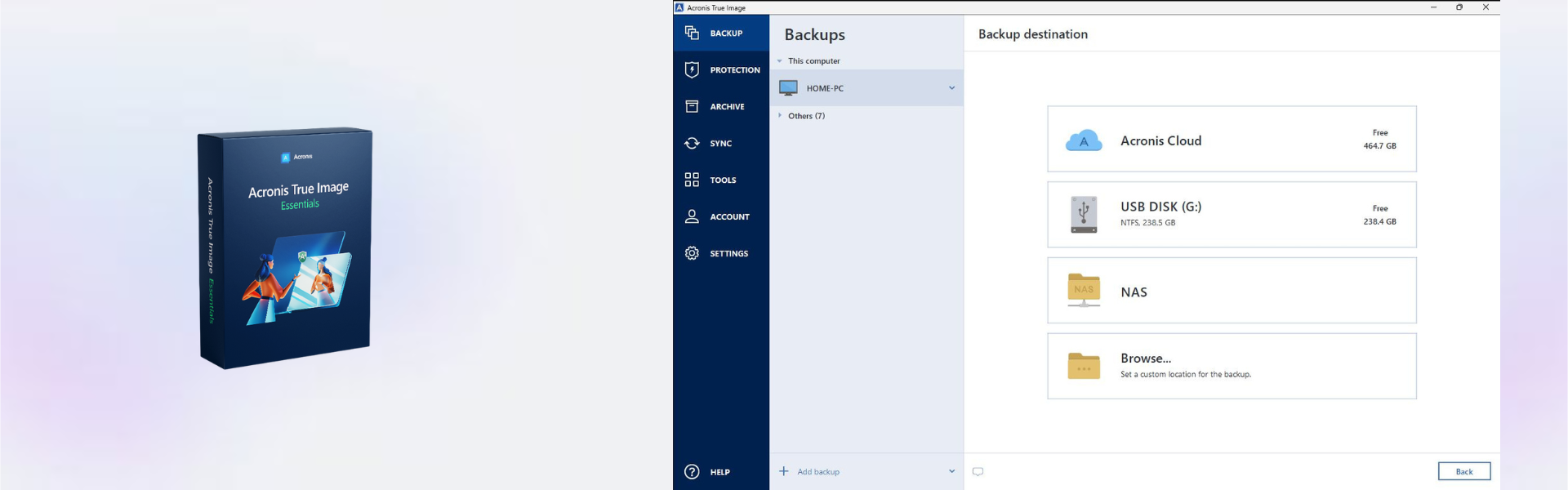
Acronis True Image Essentials gives home users, students, and small teams a simple way to protect important files and keep data safe. You receive instant digital delivery by email, so you can activate quickly and start using your backup tools without delay.
This edition is built for secure, no-stress protection on one device for the active term. It is ideal for users who want reliable backup software without a complex setup or unnecessary extras.
Overview of Acronis True Image Essentials
- Platform: Windows/ MacOS
- Edition: Essentials
- Devices: 1 Device
- License Duration: 1 Year
- Activation Method: Online activation
- Delivery: Instant digital delivery via email
- Support: Email and remote assistance
- Language Support: Multi-language
- Compliance: Genuine software licenses sourced through compliant distribution channels in line with U.S. laws and industry standards
Key Features
- Full image backup: Save your entire system, so you can recover files, apps, and settings after data loss.
- File and folder backup: Protect selected documents, photos, and work files without backing up everything.
- Quick recovery tools: Restore important data faster, reducing downtime after accidental deletion or system issues.
- Windows and MacOS support: Use the software on your preferred desktop platform with a familiar workflow.
- Online activation: Activate your product digitally and avoid waiting for physical media.
- Multi-language interface: Work more comfortably in the language that suits you best.
- Secure backup management: Keep essential files organized and easier to recover when needed.
Main Features Explained
Complete System Backup
The full system backup feature creates a copy of your operating system, files, settings, and installed applications. This matters when your device fails, because you can restore your setup instead of rebuilding everything from scratch.
File and Folder Protection
You can back up only the files that matter most, such as business documents, school projects, invoices, photos, or personal records. As a result, daily protection becomes faster and easier to manage.
Simple Recovery Workflow
Acronis True Image Essentials helps you recover lost or damaged files with a clear restore process. This is useful for home users, freelancers, and students who need quick access to important data after an error or device issue.
Cross-Platform Flexibility
Because it supports Windows and MacOS, the product is practical for users who work across different environments. Therefore, it fits both personal and professional backup needs.
Why Choose Acronis True Image Essentials?
Acronis True Image Essentials is a smart choice for users who want dependable backup protection without advanced tools they may not need. It is especially useful for personal computers, study devices, home offices, and small business workstations.
If you want to explore more protection tools, visit our backup and data recovery software category. You can also compare this edition with Acronis True Image Advanced if you need more features.
Acronis True Image Essentials vs Alternatives
Acronis True Image Essentials focuses on core backup and recovery for one device. In comparison, Acronis True Image Advanced is better suited for users who need broader protection features and more advanced backup options.
For users comparing different backup brands, AOMEI Backupper Professional may be relevant. However, Acronis is often preferred by users who want a trusted backup workflow with strong system image recovery.
System Compatibility
Acronis True Image Essentials works with Windows and MacOS systems. Before activation, make sure your device has a stable internet connection, enough storage space for backups, and administrator access for installation.
License Type Explanation
This product is supplied for one device with a one-year duration. Activation is completed online, and use is linked to the supported device and active term shown in the overview.
Installation & Activation
- Complete your order and check your email for digital delivery details.
- Download the official installation file using the provided instructions.
- Install Acronis True Image Essentials on your Windows or MacOS device.
- Open the software and start online activation.
- Follow the activation prompts and sign in if required.
- Create your first backup plan to protect important files or your full system.
Why Buy From Us
Digital License provides fast delivery, reliable support, and compliant software sourcing for personal and business customers.
- Instant digital delivery via email
- Genuine software licenses
- Secure payment process
- Email and remote assistance support
- Compliance with U.S. laws and industry standards
FAQ
How do I activate Acronis True Image Essentials?
You activate the software online after installation by following the provided activation instructions.
How fast will I receive the product?
Delivery is instant by email after purchase, so you can start installation quickly.
Is Acronis True Image Essentials compatible with Windows and MacOS?
Yes, this product supports Windows and MacOS platforms.
Can I use it on more than one device?
No, this product is intended for one device.
Can I transfer the activation to another computer?
Use is based on the supplied activation terms for one device and the active license duration.
Is this product suitable for home users?
Yes, it is a strong option for personal files, photos, study materials, and home office documents.
Is this software legal?
Yes, Digital License supplies genuine software licenses sourced through compliant distribution channels in line with U.S. laws and industry standards.
Do you provide support?
Yes, email and remote assistance support are available to help with installation and activation.
| Component | Requirement |
| Operating System | Windows 10 / 11 or macOS 11 and later |
| Processor | 1 GHz or faster processor |
| RAM | 2 GB minimum |
| Storage | 3.5 GB of available disk space |
| License | 1 Device / 1 Year subscription |
| Compatibility | Supports both Windows and Mac devices |
| Specification | Detail |
|---|---|
| Activation | 1 Device activation |
| License validity | 1 Year subscription |
| Delivery method | By email within 15 minutes |
| Compatibility | Windows & Mac |
| Languages | Multilingual |

1 – Buy
Shop securely with SSL encryption.

2 – Receive
You will receive the license key and download link.

3 – Download
Download and install the software.

4 – Activate
Enter the license key to the software.

Ashampoo 3D CAD Professional 11
Parallels Desktop 20 Pro Edition Mac