







- Description
- Minimum Requirements
- Specifications
- Additional information
EaseUS MobiMover is a practical iPhone data transfer software for moving, managing, and backing up mobile files between devices and computers. It is delivered instantly by email, so you can activate it quickly and start organizing your data without delay.
With flexible duration options, including lifetime usage, EaseUS MobiMover is ideal for users who want a secure mobile file transfer solution with no subscription when choosing the lifetime plan.
Overview of EaseUS MobiMover
- Platform: Platform: Windows/ Mac
- Devices: 1 Device
- License Duration: 1 Month/ 1 Year/ Lifetime
- Activation Method: Online activation
- Delivery: Instant digital delivery via email
- Support: Email and remote assistance
- Language Support: Multi-language
- Compliance: Genuine software licenses sourced through compliant distribution channels in line with U.S. laws and industry standards
Key Features
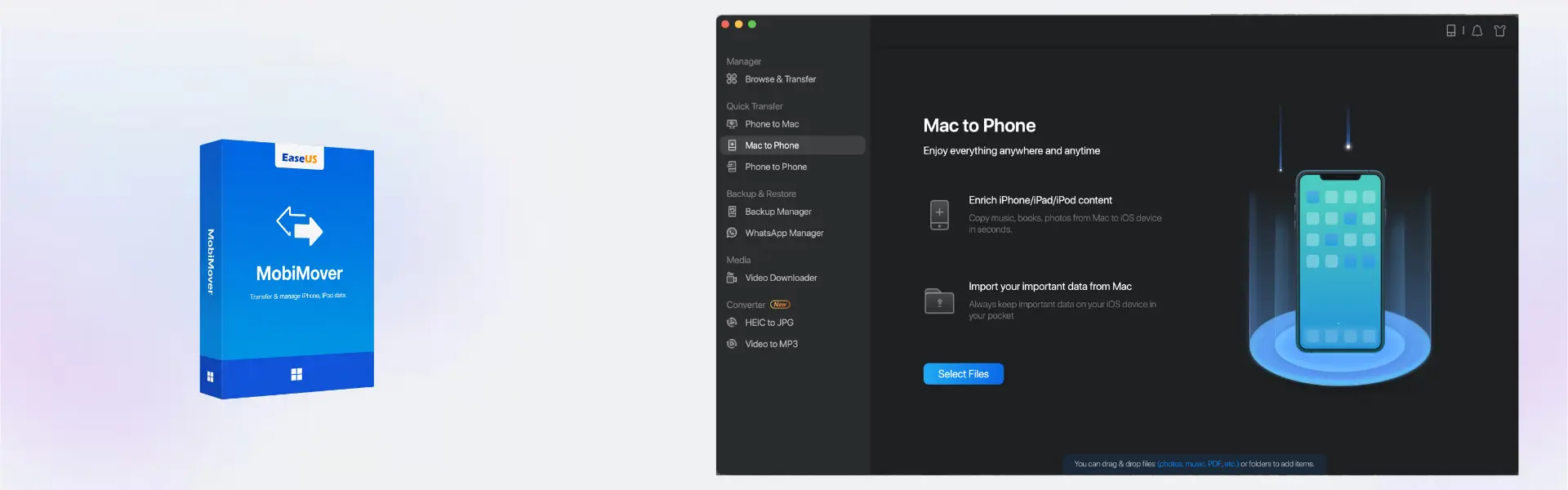
- Phone-to-computer transfer: Moves photos, videos, music, contacts, and files from a mobile device to a computer, helping users create safer local copies.
- Computer-to-phone transfer: Sends files from Windows or Mac to a mobile device, making it easier to carry documents, media, and personal content anywhere.
- Device-to-device migration: Helps move data between supported devices, reducing setup time when switching to a new phone.
- Mobile content management: Organizes files, media, and contacts from a desktop interface, giving users better control over their mobile data.
- Backup support: Helps preserve important mobile content on a computer, reducing the risk of losing photos, videos, and work files.
- Fast digital delivery: Activation details arrive by email, so users can install and activate the software quickly.
- Windows and Mac compatibility: Supports common desktop workflows, making it useful for home users, students, and professionals.
Main Features Explained
Mobile Data Transfer
EaseUS MobiMover helps users move mobile data between a phone and a computer. This is useful when saving photos, moving videos, transferring documents, or keeping important files available across devices.
Device Migration
The software supports data movement between supported devices, which helps users set up a new phone more easily. This matters because switching devices can take time, especially when photos, contacts, and media files need to be moved safely.
Media File Management
EaseUS MobiMover helps manage photos, videos, and music through a desktop workflow. As a result, home users, students, and creators can organize mobile content more efficiently without relying only on phone storage.
Backup and Local Storage
The software helps create local copies of important mobile files on Windows or Mac. This gives users a practical mobile backup option for protecting personal memories, study files, work content, and business media.
Desktop-Based Mobile Management
Using a computer interface makes it easier to view, move, and organize larger file collections. Therefore, mobile file management becomes faster and more comfortable for users who handle many photos, videos, or documents.
Why Choose EaseUS MobiMover?
EaseUS MobiMover is designed for users who need a simple way to move, manage, and back up mobile data from a Windows or Mac computer. It is a strong choice for home users, students, content creators, office workers, and small businesses that need a clear phone transfer tool for everyday workflows.
You can explore more digital software solutions in our computer programs category. For users comparing EaseUS utilities, EaseUS OS2Go Professional is focused on creating portable Windows systems, while EaseUS MobiMover is built for mobile data transfer and content management.
If you also work with media, EaseUS RecExperts helps record screen content, while EaseUS VideoKit supports video conversion and media editing workflows.
EaseUS MobiMover vs Alternatives
EaseUS MobiMover focuses on mobile data transfer, backup, and content management. In comparison, EaseUS OS2Go Professional is designed for portable Windows creation and system portability. Therefore, MobiMover is the better choice when your main goal is moving or managing mobile files.
Compared with manual file handling, EaseUS MobiMover provides a more guided and organized workflow. This helps reduce confusion, saves time, and makes large file transfers easier for everyday users.
System Compatibility
EaseUS MobiMover is designed for Windows and Mac workflows based on the selected setup and supported device conditions. For best results, install it on a compatible computer, connect your mobile device with a stable cable, and follow the on-screen transfer instructions.
License Type Explanation
This product is supplied for 1 device with online activation. After activation, the available usage period depends on the selected duration option: 1 month, 1 year, or lifetime. Choose the lifetime option if you want long-term mobile transfer access without recurring subscription use.
Installation & Activation
- Complete your order and check your email for the digital delivery details.
- Download and install EaseUS MobiMover on a compatible Windows or Mac device.
- Open the software and connect your supported mobile device.
- Activate the product online using the provided activation details.
- Select the transfer, backup, or management function you need.
- Follow the guided steps to move or organize your mobile content.
Why Buy From Us
Digital License provides a fast, secure, and professional way to purchase genuine software licenses for personal and business use. Your order is delivered digitally, and our support team is available to help with setup and activation.
- Instant digital delivery by email
- Genuine software licenses
- Secure payment process
- Email and remote assistance support
- Compliance with U.S. laws and industry standards
Trust & Reliability
Genuine software licenses sourced through compliant distribution channels in line with U.S. laws and industry standards
FAQ
How is EaseUS MobiMover delivered?
It is delivered digitally by email after purchase, so you can access your activation details quickly.
How do I activate EaseUS MobiMover?
You activate the software online using the activation details provided with your order.
Which platforms does EaseUS MobiMover support?
It supports Windows and Mac workflows based on the selected setup and supported device conditions.
Can EaseUS MobiMover transfer photos and videos?
Yes, it helps move supported photos, videos, music, documents, contacts, and other mobile content between devices and computers.
Can I use EaseUS MobiMover on more than one device?
The supplied product details cover use for 1 device.
Does EaseUS MobiMover include lifetime usage?
Yes, lifetime is one of the available duration options, along with 1 month and 1 year.
Can I transfer EaseUS MobiMover to another device?
Use is provided for 1 device. Transfer options depend on the activation terms available for the selected duration and product setup.
Is EaseUS MobiMover legal to use?
Yes, it is supplied as genuine software through compliant distribution channels in line with U.S. laws and industry standards.
Do you provide support after purchase?
Yes, email and remote assistance support are available to help with installation and activation.
| Component | Requirement |
| Processor | 1 GHz processor or faster |
| RAM | 512 MB minimum (1 GB recommended) |
| Storage | 100 MB available disk space |
| Operating System | Windows 11, 10, 8.1/ macOS 10.13 or later |
| Graphics card | Standard VGA compatible graphics |
| Display | 1024 × 768 resolution or higher |
| Other Requirements | USB cable and iTunes installed for iOS device recognition |
| Specification | Detail |
|---|---|
| Activation | Single Device License (1 PC) |
| License validity | 1 Month / 1 Year / Lifetime (one-time purchase) |
| Delivery method | By email within 5–15 minutes |
| Languages | Multilingual |
Additional information
| Operating systems | Mac, Windows |
|---|---|
| Subscription period | 1 Month, 1 Year, Lifetime |

1 – Buy
Shop securely with SSL encryption.

2 – Receive
You will receive the license key and download link.

3 – Download
Download and install the software.

4 – Activate
Enter the license key to the software.
VMware vCenter Server 7 Standard

Corel Painter Essentials 7 (PC - Mac)