







- Description
- Minimum Requirements
- Specifications
- Additional information
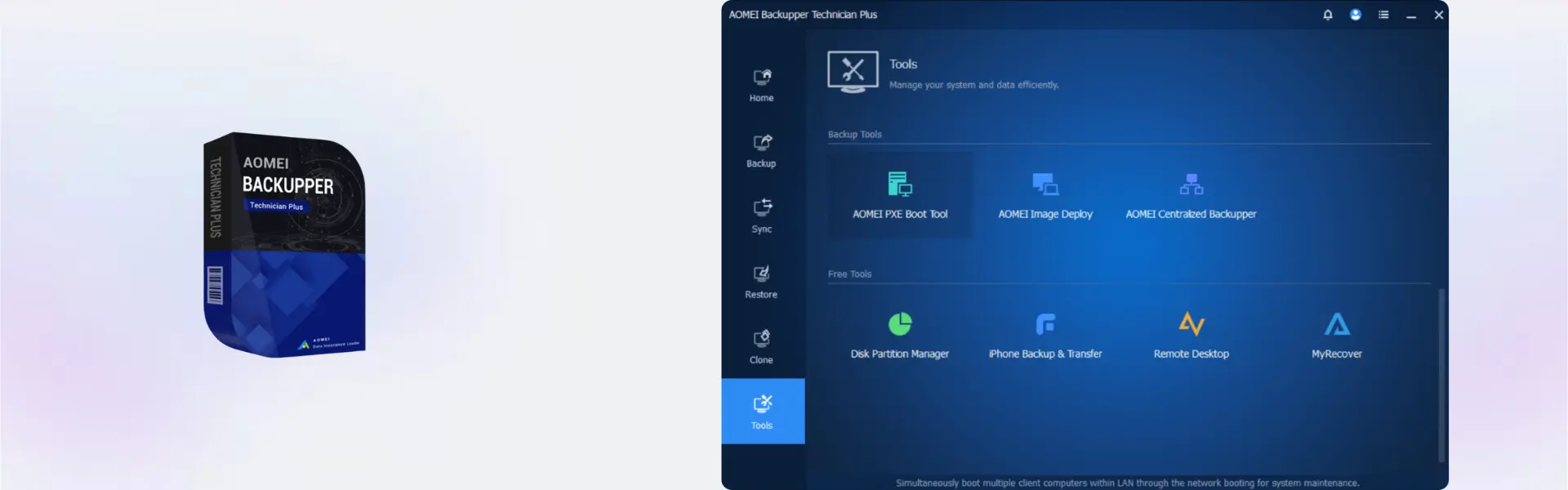
AOMEI Backupper Technician Plus Edition is a professional backup, recovery, cloning, and deployment solution for Windows technicians, IT service providers, and business support teams. With instant digital delivery via email, you can activate quickly and choose yearly or lifetime usage with no subscription required for the lifetime option.
It is built for users who manage multiple computers and need reliable protection across unlimited devices. Therefore, it helps reduce downtime, protect client systems, and simplify daily backup operations.
Overview of AOMEI Backupper Technician Plus Edition
- Platform: Windows
- Edition: Technician Plus
- Devices: Unlimited Device
- License Duration: 1 Year/ Lifetime
- Activation Method: Online activation
- Delivery: Instant digital delivery via email
- Support: Email and remote assistance
- Language Support: Multi-language
- Compliance: Genuine software licenses sourced through compliant distribution channels in line with U.S. laws and industry standards
Key Features
- Unlimited device support: Manage backup and recovery tasks across unlimited Windows devices, making it ideal for technicians and service teams.
- System backup and restore: Protect full Windows systems, so devices can be recovered quickly after crashes, corruption, or failed updates.
- Disk and partition backup: Secure important drives and partitions to reduce the risk of business data loss.
- Disk cloning tools: Move systems to new drives or upgrade storage faster without reinstalling Windows from scratch.
- File and folder backup: Protect selected business files, client data, and documents with a more focused backup workflow.
- Technician-focused usage: Support multiple clients and workstations with tools designed for professional IT environments.
- Flexible duration options: Choose one-year access or lifetime usage depending on your service model and long-term needs.
Main Features Explained
System Backup
AOMEI Backupper Technician Plus Edition allows technicians to create full system images for Windows computers. This is useful when supporting business users, client workstations, or office PCs that must be restored quickly after failure.
Disk Cloning
The cloning feature helps move an existing system from one drive to another. It is especially helpful when upgrading from HDD to SSD, replacing faulty storage, or preparing devices for faster performance.
File and Folder Backup
Technicians can protect selected folders, documents, and client files without backing up the full system every time. This saves time and makes routine data protection more efficient.
Recovery and Restore Tools
Recovery tools help restore systems, files, partitions, or full drives after data loss. This matters for IT professionals because fast recovery can reduce downtime and protect customer trust.
Why Choose AOMEI Backupper Technician Plus Edition?
AOMEI Backupper Technician Plus Edition is made for professionals who need backup and recovery tools across many Windows devices. It is ideal for IT technicians, managed service providers, repair shops, consultants, and businesses that manage multiple PCs.
You can explore more protection tools in our backup and data recovery software category. If you only need server-focused protection, AOMEI Backupper Server may be a useful comparison.
AOMEI Backupper Technician Plus Edition vs Alternatives
AOMEI Backupper Technician Plus Edition is designed for professional use across unlimited Windows devices. In comparison, AOMEI Backupper Professional is better suited for individual users who need backup tools for personal or single-device use.
If your main need is creating a recovery environment for client computers, AOMEI OneKey Recovery Technician may also be relevant. However, AOMEI Backupper Technician Plus Edition is the stronger choice for complete backup, cloning, and restore workflows.
System Compatibility
AOMEI Backupper Technician Plus Edition is designed for Windows devices. Before installation, make sure each system has internet access for online activation, enough storage space for backup images, and administrator permission for setup and recovery tasks.
License Type Explanation
This product is supplied for unlimited Windows devices with one-year and lifetime duration options available. Activation is completed online, and usage follows the selected duration and product terms shown in the overview.
Installation & Activation
- Complete your order and check your email for digital delivery details.
- Download AOMEI Backupper Technician Plus Edition using the provided instructions.
- Install the software on your Windows device.
- Open the program and start online activation.
- Follow the activation prompts until the software is ready to use.
- Create your first backup, clone, or recovery task based on your needs.
Why Buy From Us
Digital License provides a secure and professional way to purchase backup and recovery software for technical, business, and service environments.
- Instant digital delivery via email
- Genuine software licenses
- Secure payment process
- Email and remote assistance support
- Compliance with U.S. laws and industry standards
Trust & Reliability
Digital License focuses on genuine software, clear delivery, and dependable customer support. Our software licenses are sourced through compliant distribution channels in line with U.S. laws and industry standards.
FAQ
How do I activate AOMEI Backupper Technician Plus Edition?
You activate it online after installation by following the instructions delivered by email.
How will I receive the product?
You receive instant digital delivery via email after your order is completed.
Is AOMEI Backupper Technician Plus Edition compatible with Windows?
Yes, this product is designed for Windows devices.
Can I use it on multiple devices?
Yes, this edition supports unlimited devices according to the product specifications.
Does it include a lifetime option?
Yes, lifetime usage is available as one of the duration options.
Can I transfer it to another computer?
Use depends on the selected product terms and activation rules. Our support team can help with activation guidance.
Is this product suitable for IT technicians?
Yes, it is designed for technicians, service providers, and users who manage backup tasks across many Windows devices.
Is this product legal?
Yes, Digital License supplies genuine software licenses sourced through compliant distribution channels in line with U.S. laws and industry standards.
Do you provide support?
Yes, email and remote assistance support are available for installation and activation help.
| Component | Requirement |
| Processor | 1 GHz or faster CPU |
| RAM | 512 MB or more (1 GB recommended) |
| Storage | 200 MB available space for installation |
| Operating System | Windows 11 / 10 / 8.1 / 8 / 7 / Vista / XP (32-bit & 64-bit) |
| File System | NTFS, FAT32, FAT16, EXT2/EXT3, ReFS |
| Other | Mouse or other pointing device |
| Specification | Detail |
|---|---|
| Edition | AOMEI Backupper Technician Plus Edition |
| Activation | Technician license for use on unlimited PCs within one company and for servicing client devices |
| License options | 1 Year License or Lifetime License |
| License validity | 1 Year (renewable) or Lifetime license (does not expire) |
| Features | Professional backup, restore, cloning, deployment, and recovery toolkit for technicians and IT service providers |
| Delivery method | Digital delivery by email within 15 minutes |
| Languages | Multilingual |
Additional information
| Devices | Unlimited |
|---|---|
| Subscription period | 1 Year, Lifetime |

1 – Buy
Shop securely with SSL encryption.

2 – Receive
You will receive the license key and download link.

3 – Download
Download and install the software.

4 – Activate
Enter the license key to the software.
Ashampoo 3D CAD Professional 10
Ashampoo 3D CAD Professional 11
Parallels Desktop Standard 20 Mac