







- Description
- Minimum Requirements
- Specifications
AOMEI Image Deploy Technician Edition is a professional image deployment software for technicians who need to deploy system images across Windows computers efficiently. It includes instant digital delivery, so you can activate it quickly and start deployment work without delay.
With lifetime usage and no subscription, AOMEI Image Deploy Technician Edition is ideal for IT teams, repair shops, and service providers that need a reliable Windows deployment tool.
Overview of AOMEI Image Deploy Technician Edition
- Platform: Windows
- License Type: Technician
- Devices: Technician
- License Duration: Lifetime
- Activation Method: Online activation
- Delivery: Instant digital delivery via email
- Support: Email and remote assistance
- Language Support: Multi-language
- Compliance: Genuine software licenses sourced through compliant distribution channels in line with U.S. laws and industry standards
Key Features
- System image deployment: Deploys a prepared Windows image to multiple computers, helping technicians save setup time.
- Technician workflow: Supports professional IT tasks, making it useful for repair shops and service providers.
- Network-based deployment: Helps roll out systems across connected devices, reducing repeated manual installations.
- Windows setup consistency: Keeps deployed systems more uniform, which improves maintenance and support.
- Time-saving deployment: Speeds up workstation preparation for offices, labs, and business environments.
- Lifetime usage: Provides long-term access without recurring subscription use.
- Instant digital delivery: Activation details arrive by email for fast setup.
Main Features Explained
Windows Image Deployment
AOMEI Image Deploy Technician Edition helps deploy a prepared Windows system image to other computers. This is useful for IT teams setting up several devices with the same system configuration.
Technician-Level Deployment
The Technician license is designed for professional service work. It helps technicians manage repeated deployment tasks for clients, offices, schools, and business systems.
Business System Rollout
Businesses can use the software to prepare multiple computers faster. As a result, teams save time during upgrades, replacements, and new device setup.
Consistent Device Setup
Deploying the same image helps keep systems consistent. This makes support easier and helps reduce setup differences across devices.
Why Choose AOMEI Image Deploy Technician Edition?
AOMEI Image Deploy Technician Edition is built for IT professionals who need a practical system deployment tool for Windows environments. It is a strong choice for technicians, service providers, schools, offices, and businesses that prepare multiple computers.
You can explore more server management software in our server management infrastructure software category. For disk and partition work, AOMEI Partition Assistant Technician focuses on storage management, while AOMEI Image Deploy Technician Edition focuses on system image deployment.
For related recovery workflows, AOMEI OneKey Recovery Technician supports technician recovery tasks, while AOMEI OneKey Recovery Customization is useful for branded recovery solutions.
AOMEI Image Deploy Technician Edition vs Alternatives
AOMEI Image Deploy Technician Edition focuses on Windows image deployment and repeated system rollout. In comparison, AOMEI Partition Assistant Technician is better for disk partition management, resizing, cloning, and storage maintenance.
System Compatibility
AOMEI Image Deploy Technician Edition is designed for Windows environments. For best results, prepare a clean system image, confirm network stability, and ensure target devices meet the required Windows deployment conditions.
License Type Explanation
This product includes a Technician license for professional deployment work. It is designed for IT technicians and service providers who need lifetime access to image deployment software without recurring subscription use.
Installation & Activation
- Complete your order and check your email for the digital delivery details.
- Download and install AOMEI Image Deploy Technician Edition on a compatible Windows device.
- Open the software and activate it online using the provided details.
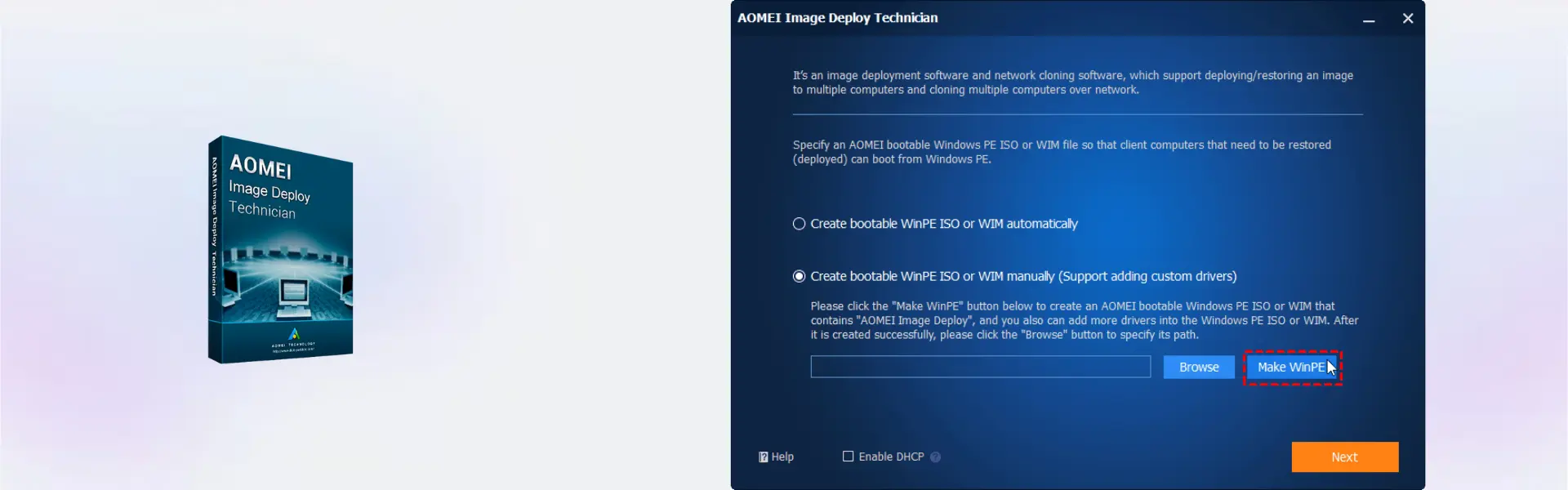
- Prepare the system image you want to deploy.
- Connect the target computers through the required network setup.
- Start the deployment task and follow the on-screen instructions.
Why Buy From Us
Digital License provides a fast, secure, and professional way to purchase genuine software licenses for technician and business use.
- Instant digital delivery by email
- Genuine software licenses
- Secure payment process
- Email and remote assistance support
- Compliance with U.S. laws and industry standards
Trust & Reliability
Genuine software licenses sourced through compliant distribution channels in line with U.S. laws and industry standards
FAQ
How is AOMEI Image Deploy Technician Edition delivered?
It is delivered digitally by email after purchase, so you can access your activation details quickly.
How do I activate AOMEI Image Deploy Technician Edition?
You activate the software online using the activation details provided with your order.
Which platform does AOMEI Image Deploy Technician Edition support?
It supports Windows environments.
Who is this product designed for?
It is designed for technicians, IT teams, repair shops, and service providers.
Does it include lifetime usage?
Yes, this product includes lifetime usage.
Can it be transferred?
Use depends on the Technician license terms and the selected product setup.
Is AOMEI Image Deploy Technician Edition legal to use?
Yes, it is supplied as genuine software through compliant distribution channels in line with U.S. laws and industry standards.
Do you provide support after purchase?
Yes, email and remote assistance support are available to help with installation and activation.
| Component | Requirement |
| Processor | 1 GHz or faster (x86 or x64 processor) |
| RAM | 512 MB minimum (1 GB or more recommended) |
| Storage | At least 300 MB of free disk space for installation |
| Operating System | Windows 11 / 10 / 8.1 / 8 / 7 / Vista / XP (32-bit & 64-bit) |
| Network | PXE boot-supported network environment required for deployment |
| Additional Requirements | DHCP server or AOMEI PXE Tool; network adapters must support PXE boot |
| Specification | Detail |
|---|---|
| License type | Technician Edition (commercial use) |
| Activation | Install and use on multiple PCs within one company / for technician service use |
| License validity | Lifetime license |
| Delivery method | Digital delivery by email |
| Languages | Multilingual |

1 – Buy
Shop securely with SSL encryption.

2 – Receive
You will receive the license key and download link.

3 – Download
Download and install the software.

4 – Activate
Enter the license key to the software.

Corel Painter Essentials 7 (PC - Mac)