























- Description
- Minimum Requirements
- Specifications
VMware ThinApp is a powerful application virtualization solution that allows you to run software without traditional installation. With instant delivery and lifetime usage, it offers a flexible, subscription-free approach to application deployment and management.
Designed for businesses and IT professionals, it simplifies software distribution while maintaining system stability and security.
Overview of VMware ThinApp
- Platform: Windows 7 or later
- Edition: ThinApp
- License Type: Retail
- Devices: 1 Device
- License Duration: Lifetime
- Activation Method: Online activation
- Delivery: Instant digital delivery via email
- Support: Email and remote assistance
- Language Support: Multi-language
- Compliance: Genuine software licenses sourced through compliant distribution channels in line with U.S. laws and industry standards
Key Features
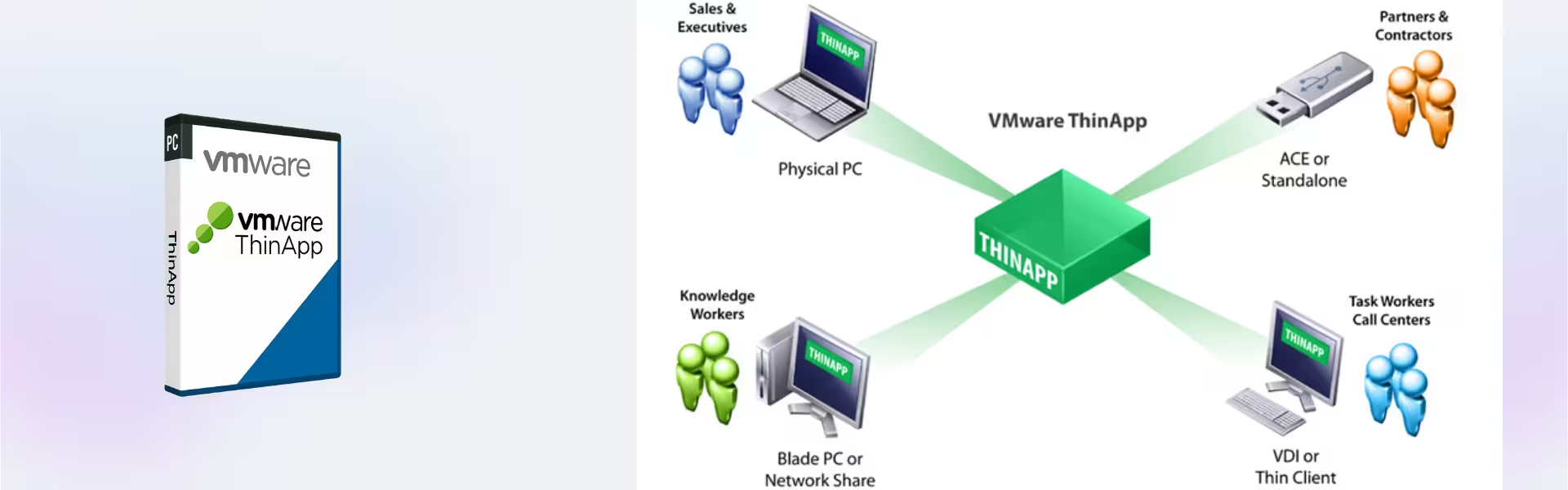
- Application Virtualization: Run applications without installing them on the system, reducing conflicts and improving system stability.
- Portable Applications: Deploy apps on USB drives or network storage, enabling access across multiple systems without reinstallation.
- Isolation Technology: Keeps applications separate from the operating system, preventing compatibility issues and system changes.
- Legacy Application Support: Run older software on modern operating systems, extending the usability of critical tools.
- Easy Deployment: Simplifies software distribution across teams, saving time and reducing IT workload.
- Centralized Management: Manage virtualized applications efficiently in enterprise environments.
- Secure Environment: Protect systems from unwanted changes and maintain a clean operating environment.
Main Features Explained
Application Virtualization
This feature allows applications to run independently of the operating system. Businesses can deploy software without installation conflicts, improving efficiency and reducing downtime.
Portable Application Execution
Run applications from external drives or network locations. This is useful for remote teams and IT departments that need flexible access to tools without repeated installations.
Isolation and Compatibility
Applications operate in isolated environments, preventing interference with other software. This ensures compatibility and stability, especially in complex IT setups.
Legacy Software Support
Run older applications on newer systems without compatibility issues. This helps organizations maintain access to critical legacy tools without upgrading or replacing them.
Why Choose VMware ThinApp?
VMware ThinApp is ideal for businesses, IT professionals, and organizations that need efficient application deployment and management. It supports secure software distribution, simplifies IT operations, and ensures compatibility across systems.
Explore more solutions in our virtualization software category to enhance your IT infrastructure.
For full infrastructure virtualization, VMware vSphere 7.0 Enterprise Plus offers advanced server and resource management capabilities.
To automate deployment workflows, VMware vRealize Automation 8 provides powerful automation tools.
For monitoring and optimization, VMware vRealize Operations Management 7 helps maintain system performance and efficiency.
VMware ThinApp vs Alternatives
Compared to traditional software installation methods, VMware ThinApp eliminates system conflicts and simplifies deployment. Unlike full virtualization platforms, it focuses specifically on application portability and compatibility.
While other virtualization tools manage entire systems, ThinApp specializes in application-level virtualization, making it lightweight and efficient.
System Compatibility
VMware ThinApp is compatible with Windows 7 or later systems. It works across modern Windows environments, ensuring reliable performance and compatibility with a wide range of applications.
Installation & Activation
- Complete your purchase and receive the product via email instantly
- Download the VMware ThinApp installation package
- Install the software on your Windows system
- Enter the provided activation details
- Activate the product online
- Start creating and deploying virtualized applications
Why Buy From Us
We provide secure, reliable, and professional software solutions tailored to your needs.
- Instant digital delivery
- Genuine and compliant licenses
- Secure payment methods
- 24/7 customer support
- Compliance with U.S. laws and industry standards
Trust & Reliability
All products are sourced through verified distribution channels, ensuring authenticity and compliance. We prioritize secure transactions and dependable customer support.
FAQ
How is VMware ThinApp delivered?
The product is delivered instantly via email after purchase.
Is this a lifetime solution?
Yes, it provides lifetime usage without subscription fees.
Is online activation required?
Yes, activation is completed online after installation.
Is it compatible with Windows systems?
Yes, it supports Windows 7 or later operating systems.
Do I receive support?
Yes, 24/7 email and remote assistance are included.
Is the software genuine and compliant?
Yes, all licenses are sourced through compliant distribution channels in line with U.S. laws and industry standards.
What is VMware ThinApp used for?
It is used to virtualize applications, allowing them to run without installation and improving compatibility and deployment efficiency.
| Component | Requirement |
| Processor | 1 GHz or faster CPU |
| RAM | 2 GB minimum (4 GB recommended) |
| Storage | 500 MB for installation (additional space required for packaged applications) |
| Operating System (Capture Machine) | Windows 7, Windows 10, or Windows 11 (clean environment recommended) |
| Operating System (Deployment) | Windows 7 or later |
| Additional Requirements | Administrator privileges required for setup capture; clean virtual machine recommended for best results |
| Specification | Detail |
|---|---|
| Activation | Single PC (one-time activation) |
| License validity | Lifetime (does not expire after activation) |
| Delivery method | By email within 15 minutes |
| Languages | Multilingual |

1 – Buy
Shop securely with SSL encryption.

2 – Receive
You will receive the license key and download link.

3 – Download
Download and install the software.

4 – Activate
Enter the license key to the software.
Vmware vCenter Server 8 Standard
