







- Description
- Minimum Requirements
- Specifications
- Additional information
VMware vRealize Automation 7 is a powerful automation platform designed to streamline IT service delivery and infrastructure management. With instant digital delivery and lifetime usage, it offers a cost-effective alternative to subscription-based automation tools.
Built for efficiency and scalability, VMware vRealize Automation 7 enables organizations to automate workflows, reduce manual tasks, and accelerate deployment across virtual environments.
Overview of VMware vRealize Automation 7
- Platform: vRealize Automation Appliance (SUSE Linux-based)
- Edition: vRealize Automation 7
- License Type: Retail
- Devices: 1/ 5/ 10/ 20 Devices
- License Duration: Lifetime
- Activation Method: Online activation
- Delivery: Instant digital delivery via email
- Support: Email and remote assistance
- Language Support: Multi-language
- Compliance: Genuine software licenses sourced through compliant distribution channels in line with U.S. laws and industry standards
Key Features
- Automated Provisioning: Deploy virtual machines and services instantly, reducing setup time and increasing productivity.
- Self-Service Portal: Allows users to request resources independently, improving efficiency and reducing IT workload.
- Policy-Based Governance: Enforce compliance and control access, ensuring secure and consistent operations.
- Multi-Cloud Support: Manage resources across different environments from a single platform.
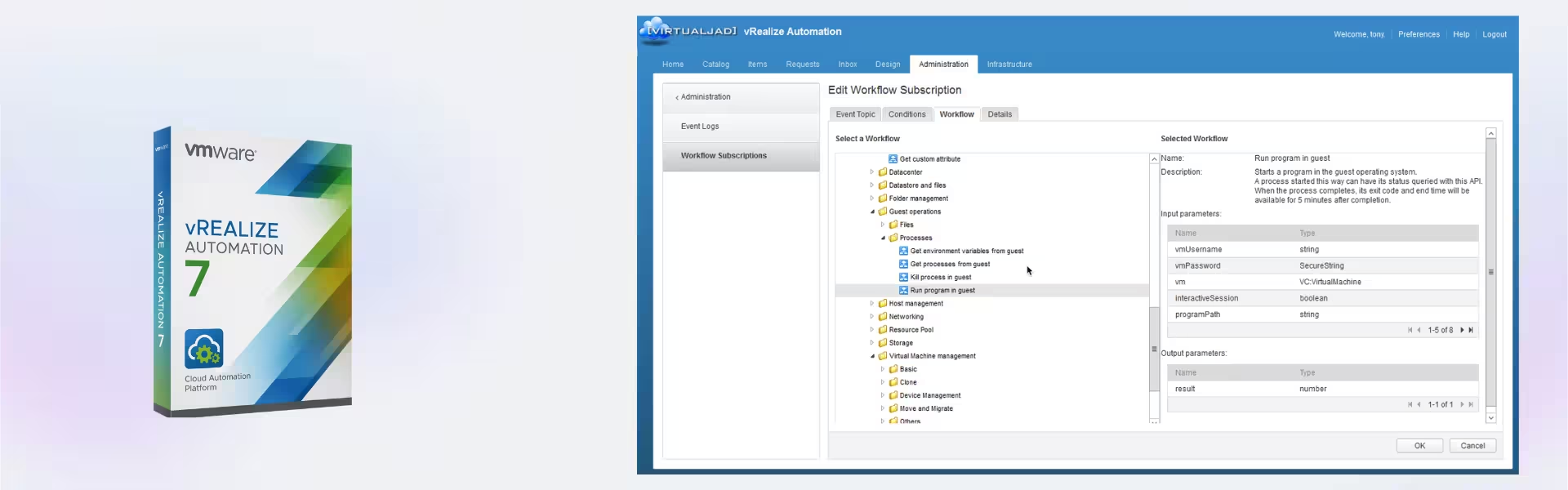
- Workflow Automation: Automate repetitive IT processes to minimize errors and improve consistency.
- Scalable Infrastructure Management: Adapt to growing infrastructure needs without complexity.
- Integration with VMware Ecosystem: Works seamlessly with VMware tools for a unified environment.
Main Features Explained
Automated Service Delivery
VMware vRealize Automation 7 enables rapid deployment of virtual machines and services through automated workflows. In real-world scenarios, IT teams can deploy applications in minutes instead of hours, improving service delivery speed.
Self-Service Infrastructure Access
Users can request and manage resources through an intuitive portal. This reduces dependency on IT teams and empowers departments to operate more efficiently.
Policy and Compliance Management
Administrators can define policies to control resource usage and enforce compliance. This ensures secure and standardized operations across the organization.
Cross-Environment Automation
The platform supports automation across multiple environments, including private and hybrid clouds. This allows businesses to manage complex infrastructures with ease.
Workflow Optimization
Automation of repetitive tasks reduces human error and improves operational consistency, helping organizations maintain stable and efficient systems.
Why Choose VMware vRealize Automation 7?
VMware vRealize Automation 7 is ideal for businesses, IT professionals, and organizations looking to automate infrastructure and improve operational efficiency. It simplifies complex processes, enhances productivity, and reduces deployment time.
Explore more enterprise solutions in our VMware licenses category to build a fully optimized environment.
Compared to VMware vRealize Network Insight, which focuses on network visibility, this platform specializes in automation and service delivery.
To enhance virtualization infrastructure, VMware vSphere 8 Essentials Plus provides advanced virtualization capabilities.
For efficient storage management, VMware vSAN 7 Advanced integrates seamlessly with automated environments.
VMware vRealize Automation 7 vs Alternatives
Compared to newer versions, VMware vRealize Automation 7 provides reliable automation capabilities with proven stability. While newer releases offer additional features, this version remains a solid and cost-effective solution for automation needs.
System Compatibility
VMware vRealize Automation 7 runs on a SUSE Linux-based appliance and requires a VMware-compatible environment. It integrates seamlessly with VMware infrastructure and supports modern virtualization setups.
Installation & Activation
- Deploy the vRealize Automation appliance in your VMware environment.
- Access the system via web interface.
- Configure initial settings and infrastructure connections.
- Enter activation details received via email.
- Set up workflows and begin automation.
Why Buy From Us
Digital License ensures a secure and professional purchasing experience for all software products.
- Instant digital delivery via email
- Genuine and compliant software licenses
- Secure payment methods
- 24/7 email and remote support
- Compliance with U.S. laws and industry standards
Trusted by Professionals
Our solutions are trusted by IT professionals worldwide, delivering reliable and compliant software for modern infrastructure management.
FAQ
How do I activate VMware vRealize Automation 7?
You will receive activation details via email, which can be used for online activation within the platform.
Is delivery instant?
Yes, your product is delivered instantly via email after purchase.
Is this a subscription?
No, this is a lifetime license with no recurring fees.
What systems are compatible?
It runs on a SUSE Linux-based appliance and integrates with VMware environments.
Is this product genuine?
Yes, all licenses are sourced through compliant distribution channels and meet industry standards.
Do I need additional VMware tools?
Additional tools can enhance functionality but are not required for core automation features.
Who should use VMware vRealize Automation 7?
It is ideal for businesses and IT professionals looking to automate infrastructure and workflows.
| Component | Requirement |
| Processor | Minimum 2 vCPU (4 vCPU recommended) |
| RAM | Minimum 8 GB (12–16 GB recommended) |
| Storage | Minimum 50 GB available space |
| Operating System | vRealize Automation Appliance (SUSE Linux-based) |
| Hypervisor | VMware ESXi 6.x or later |
| Database | Microsoft SQL Server (required for IaaS components) |
| Network | Static IP, DNS and NTP configured |
| Specification | Detail |
|---|---|
| Activation | 1 Device/ 5 Devices/ 10 Devices/ 20 Devices |
| License validity | Lifetime (does not expire after activation) |
| Delivery method | By email within 15 minutes |
| Languages | Multilingual |
Additional information
| Devices | 1 Device, 5 Devices, 10 Devices, 20 Devices |
|---|

1 – Buy
Shop securely with SSL encryption.

2 – Receive
You will receive the license key and download link.

3 – Download
Download and install the software.

4 – Activate
Enter the license key to the software.
Ashampoo 3D CAD Professional 10
VMware vCenter Server 7 Standard