







- Description
- Minimum Requirements
- Specifications
Stellar Repair for Access is a professional Access database repair software for Windows users who need to repair damaged Microsoft Access database files. It includes instant digital delivery, online activation, and a 1-year usage term with no monthly subscription.
This tool helps businesses, database users, and IT teams recover important Access data, restore database objects, and reduce workflow disruption.
Overview of Stellar Repair for Access
- Platform: Windows
- Devices: 1 Device
- License Duration: 1 Year
- Activation Method: Online activation
- Delivery: Instant digital delivery via email
- Support: Email and remote assistance
- Language Support: Multi-language
- Compliance: Genuine software licenses sourced through compliant distribution channels in line with U.S. laws and industry standards
Key Features
- Access database repair: Repair damaged or corrupted Access files so important database content can be opened again.
- Database object recovery: Recover tables, queries, forms, reports, indexes, and relationships to restore useful database structure.
- Preview before saving: Review recoverable items before export, helping users confirm the right data before saving.
- Business data restoration: Restore records used for customers, inventory, projects, or internal reporting to reduce downtime.
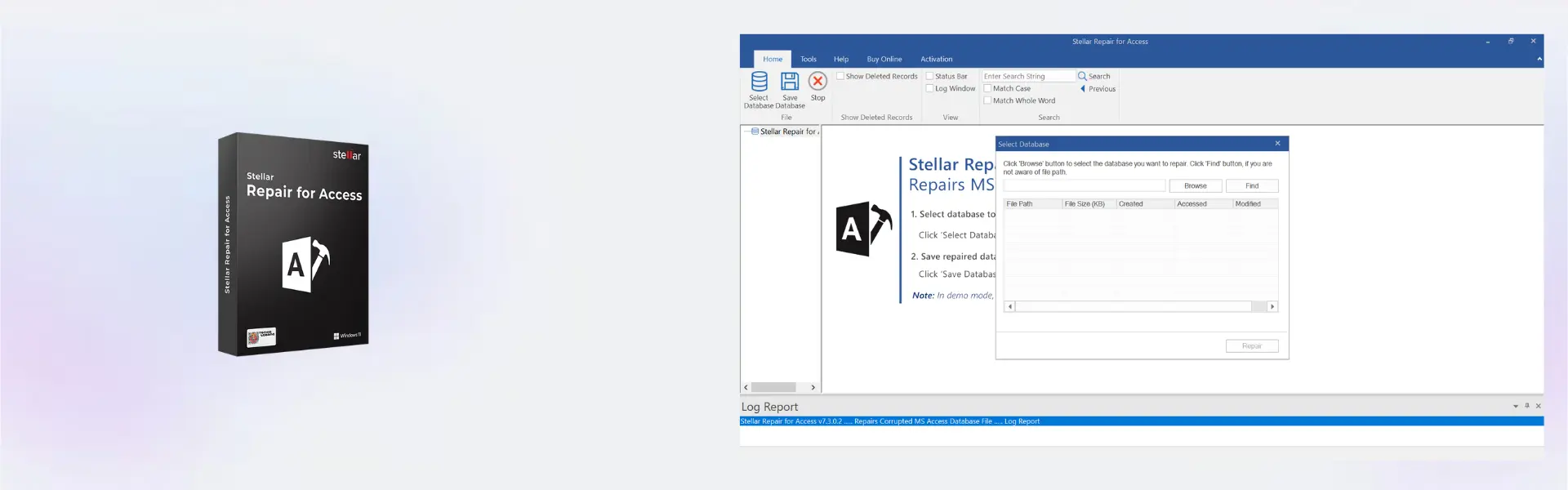
- Simple repair workflow: Use a guided Windows process that helps both technical and non-technical users repair files more easily.
- Secure local repair: Repair database files on your computer, helping keep sensitive business data under your control.
Main Features Explained
Access File Repair
Access file repair helps restore damaged Microsoft Access database files that may fail to open or show errors. This is useful when business records, reports, or project data become inaccessible due to corruption or storage issues.
Database Object Recovery
The software helps recover key database objects, including tables, queries, forms, and reports. In real use, this helps offices and small businesses recover the structure needed to continue daily operations.
Preview and Selective Saving
The preview feature lets users inspect recoverable database content before saving it. This improves confidence because users can confirm important records and objects before completing the repair process.
Business Database Restoration
Stellar Repair for Access supports practical recovery for customer lists, inventory data, reports, and internal databases. It helps reduce downtime and protect important business information.
Why Choose Stellar Repair for Access?
Stellar Repair for Access is ideal for businesses, administrators, freelancers, and home office users who rely on Microsoft Access databases. It provides a focused Access database repair solution for restoring corrupted files and recovering valuable records.
For more repair and recovery tools, explore our backup data recovery software category. If your issue involves damaged spreadsheets, compare it with Stellar Repair for Excel.
If you need broader repair coverage for multiple file types, Stellar Toolkit for File Repair may be more suitable. For Microsoft SQL Server database repair, consider Stellar Toolkit for MS SQL.
Stellar Repair for Access vs Alternatives
Stellar Repair for Access is designed specifically for Microsoft Access database repair. Compared with Stellar Repair for Excel, it is the right choice when the damaged file is an Access database rather than a spreadsheet.
Compared with Stellar Toolkit for MS SQL, this product focuses on Access database files, while the SQL toolkit is intended for Microsoft SQL Server environments. Therefore, the best option depends on the database platform you need to repair.
System Compatibility
This product is designed for Windows. Before installation, make sure your computer has enough storage space for repaired database files and a stable internet connection for online activation.
License Type Explanation
This product is provided for one Windows device with a 1-year usage term. It is activated online and intended for use during the active license period.
Installation & Activation
- Complete your order and receive instant digital delivery by email.
- Download the software using the instructions provided after purchase.
- Run the installer on your Windows computer.
- Follow the setup wizard until installation is complete.
- Activate the product online using the provided activation details.
- Contact support if you need help with installation or activation.
Why Buy From Us?
Digital License provides fast digital delivery, secure purchasing, and reliable support for a smooth software activation experience.
- Instant digital delivery via email
- Genuine licenses from compliant distribution channels
- Secure payment process
- Email and remote assistance support
- Compliance with U.S. laws and industry standards
Trust & Reliability
We provide genuine software licenses sourced through compliant distribution channels in line with U.S. laws and industry standards. Our team offers email and remote assistance to help with installation, activation, and product guidance.
FAQ
How is Stellar Repair for Access delivered?
It is delivered digitally by email after purchase for fast access.
Does Stellar Repair for Access require online activation?
Yes. Online activation is required after installation.
What is Stellar Repair for Access used for?
It is used to repair damaged Microsoft Access database files and recover database objects.
Is Stellar Repair for Access compatible with Windows?
Yes. This product is designed for Windows computers.
How many devices is it for?
It is for 1 Device, as listed in the product overview.
How long can I use it?
The product includes a 1 Year usage term.
Can I transfer it to another computer?
Transfer options depend on the activation terms provided with the product.
Is this product legal?
Yes. Licenses are sourced through compliant distribution channels in line with U.S. laws and industry standards.
Do you provide support?
Yes. Email and remote assistance are available for installation and activation help.
| Component | Requirement |
| Processor | Intel Pentium processor or compatible x64 processor |
| RAM | 4 GB RAM minimum (8 GB recommended) |
| Storage | 250 MB free disk space for installation |
| Operating System | Windows 11 / 10 / 8.1 |
| Supported Access | Microsoft Access 2021, 2019, 2016, |
| Display | Minimum screen resolution of 1024 × 768 |
| Specification | Detail |
|---|---|
| Product | Stellar Repair for Access |
| Activation | 1 Windows PC |
| License validity | 1 Year |
| Features | Repair corrupted Access database files and recover tables, forms, reports, and queries |
| Supported Access | Microsoft Access 2021, 2019, 2016, 2013 |
| Supported Formats | MDB, ACCDB |
| Delivery method | By email within 15 minutes |
| Languages | Multilingual |

1 – Buy
Shop securely with SSL encryption.

2 – Receive
You will receive the license key and download link.

3 – Download
Download and install the software.

4 – Activate
Enter the license key to the software.

Ashampoo 3D CAD Professional 10

Ashampoo 3D CAD Professional 11

CorelDRAW Graphics Suite - Mac

Corel Painter Essentials 7 (PC - Mac)