









- Description
- Minimum Requirements
- Specifications
- Additional information
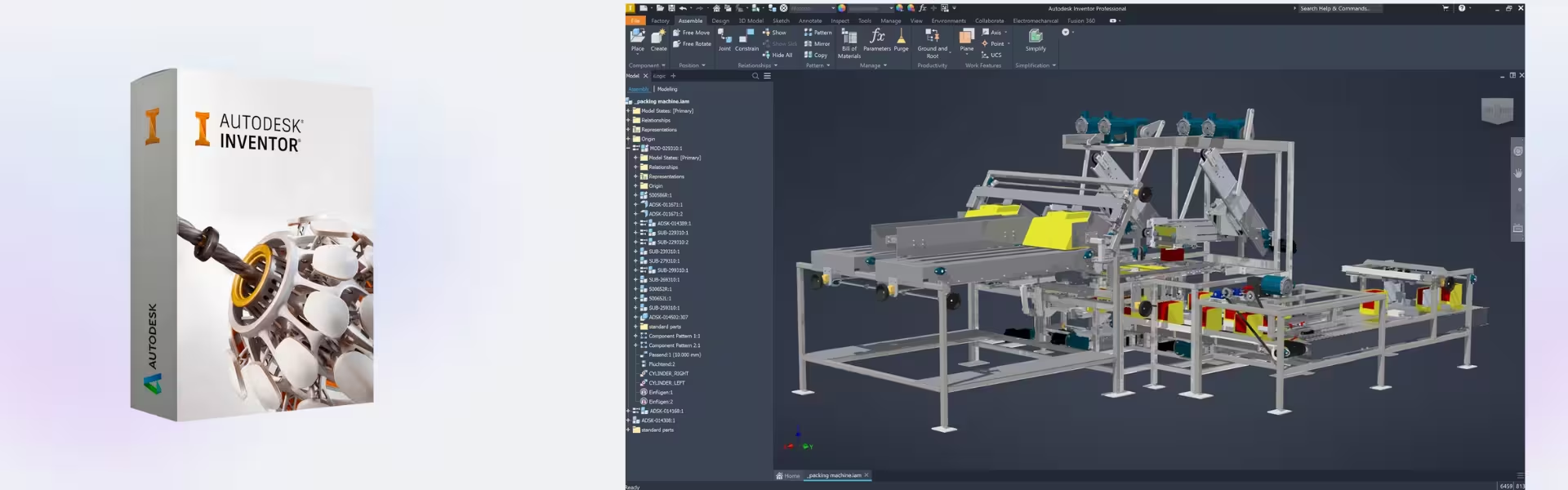
Autodesk Inventor Pro is a powerful 3D mechanical design solution built for students and future engineers who demand precision and efficiency. With instant digital delivery and a flexible subscription model, it provides long-term access to professional-grade tools for advanced product development.
Designed for Windows users, Autodesk Inventor Pro helps you create, simulate, and refine complex mechanical designs with confidence.
Overview of Autodesk Inventor Pro
- Platform: Windows
- Edition: Inventor Pro Educational
- License Type: Educational (non-commercial)
- Devices: 1 device per eligible user
- License Duration: 1 Year / 3 Years
- Activation Method: Online activation
- Delivery: Instant digital delivery via email
- Support: Email and remote assistance
- Language Support: Multi-language
- Compliance: Genuine software licenses sourced through compliant distribution channels in line with U.S. laws and industry standards
Key Features
- Parametric 3D Modeling: Build intelligent mechanical parts and assemblies that automatically update when design parameters change, improving accuracy and reducing redesign time.
- Advanced Simulation Tools: Test stress, motion, and performance before production, helping users avoid costly design errors.
- Assembly Design: Create complex assemblies with precise relationships between components, ensuring real-world functionality.
- Automated Drawing Generation: Produce detailed engineering drawings directly from 3D models, saving time and maintaining consistency.
- Sheet Metal Design Tools: Design and flatten sheet metal components efficiently, ideal for manufacturing workflows.
- Collaboration Integration: Share and review designs with team members easily, improving communication and project efficiency.
- Customization and Automation: Use scripts and automation features to streamline repetitive design tasks and boost productivity.
Main Features Explained
3D Mechanical Design
Autodesk Inventor Pro enables users to design precise 3D parts and assemblies for mechanical systems. In real-world applications, engineers can create prototypes of machines, tools, or components, improving design accuracy before manufacturing.
Simulation and Stress Analysis
The built-in simulation tools allow users to test how products will perform under real conditions. This is essential for students and professionals who need to validate designs and ensure reliability.
Assembly Modeling
Users can assemble multiple components into a single system and define how they interact. This helps identify potential issues early and ensures components function together seamlessly.
Sheet Metal and Manufacturing Tools
Autodesk Inventor Pro simplifies sheet metal design with tools for bending, cutting, and flattening. This is especially useful in manufacturing environments where precision and efficiency are critical.
Automated Documentation
Generate technical drawings and documentation automatically from your models, reducing manual work and ensuring accuracy across all project stages.
Why Choose Autodesk Inventor Pro?
Autodesk Inventor Pro is ideal for engineering students, product designers, and technical professionals who want to develop advanced mechanical design skills. It provides a complete environment for designing, testing, and documenting products efficiently.
Explore more professional tools in our CAD & Engineering Software collection to expand your capabilities. If you are looking for a cloud-based alternative, you can compare it with Autodesk Fusion 360, which focuses on integrated design and manufacturing in a single platform.
For visualization and rendering, Autodesk Inventor Pro can be complemented by Autodesk 3ds Max, while advanced simulation workflows can be enhanced using Autodesk CFD Ultimate.
Autodesk Inventor Pro vs Alternatives
Compared to Autodesk Fusion 360, Autodesk Inventor Pro offers more advanced desktop-based mechanical design tools and deeper control over assemblies. Fusion 360, on the other hand, is more cloud-focused and suited for collaborative workflows.
Inventor Pro is also more specialized in mechanical engineering compared to general CAD tools, making it the preferred choice for complex product design and simulation.
System Compatibility
Autodesk Inventor Pro is designed exclusively for Windows systems and requires a capable computer to handle complex 3D models and simulations. It integrates seamlessly with other Autodesk tools, ensuring a smooth workflow across design and engineering projects.
License Type Explanation
This educational license is intended for non-commercial use and is assigned to one eligible user on a single device. The subscription duration allows flexible access for 1 or 3 years, making it suitable for academic learning and training.
The license is not transferable, but it ensures continuous access to updates and features throughout the subscription period.
Installation & Activation
- Complete your purchase and receive access details via email instantly.
- Download Autodesk Inventor Pro from the official Autodesk platform.
- Install the software on your Windows device.
- Launch the application and sign in to your Autodesk account.
- Activate the software online.
- Start designing your projects immediately.
Why Buy From Us
Digital License offers a secure and reliable way to access professional software solutions.
- Instant digital delivery via email
- Genuine software sourced through compliant channels
- Secure payment options
- 24/7 email and remote support
- Compliance with U.S. laws and industry standards
Trust & Reliability
We are committed to delivering authentic software and professional support. Every purchase is backed by compliance, transparency, and customer-focused service.
FAQ
How do I activate Autodesk Inventor Pro?
Activation is completed online after installation by signing in to your Autodesk account.
How fast is delivery?
Your product is delivered instantly via email after purchase.
Is Autodesk Inventor Pro compatible with Mac?
No, it is designed for Windows systems only.
Can I install it on multiple devices?
No, the license is valid for one device per eligible user.
Is this software legitimate?
Yes, it is sourced through compliant distribution channels and meets industry standards.
Do I receive updates?
Yes, updates are included during the active subscription period.
What support is available?
We provide 24/7 email and remote assistance for installation and usage.
| Component | Requirement |
| Processor | Basic: 2.5–2.9 GHz processor Recommended: 3+ GHz processor |
| RAM | 8 GB (minimum); 16 GB (recommended) |
| Storage | 40 GB free disk space (SSD recommended) |
| Operating System | 64-bit Windows 11 or Windows 10 |
| Graphics | DirectX 12–capable GPU with 2 GB VRAM (minimum) 4 GB VRAM or more (recommended for complex assemblies and 4K displays) |
| Display | 1920 × 1080 resolution with True Color High Resolution & 4K (up to 3840 × 2160 supported) |
| Specification | Detail |
|---|---|
| Activation | Single PC (one-time activation) |
| License validity | 1 year / 3 years (renewable annually) |
| Delivery method | By email within 15 minutes |
| Languages | Multilingual |
Additional information
| Year version | 2024, 2025, 2026, 2027 |
|---|---|
| Subscription period | 1 Year, 3 Years |

1 – Buy
Shop securely with SSL encryption.

2 – Receive
You will receive the license key and download link.

3 – Download
Download and install the software.

4 – Activate
Enter the license key to the software.
Parallels Desktop 20 Pro Edition Mac